If you play Roblox Rivals often, then you already know how important aiming is. A good crosshair can help you track enemies better, hit more shots, and improve your reaction time. Many players use custom crosshair codes to get cleaner and more comfortable aim settings.
In this guide, you will find the best Roblox Rivals crosshair codes for May 2026, including dot crosshairs, sniper styles, and pro player settings. We also explain how to import these codes and choose the right crosshair for your playstyle.
What Are Crosshair Codes in Roblox Rivals?
Crosshair codes are special share codes that let players copy custom crosshair settings instantly. Instead of changing every setting manually, you can simply paste a code and use the same crosshair style as other players.
These crosshairs can change:
- Size
- Color
- Thickness
- Outline
- Gap
- Dot style
- Opacity
Many competitive Rivals players use smaller and cleaner crosshairs because they help improve visibility during fights.
Best Roblox Rivals Crosshair Codes (May 2026)
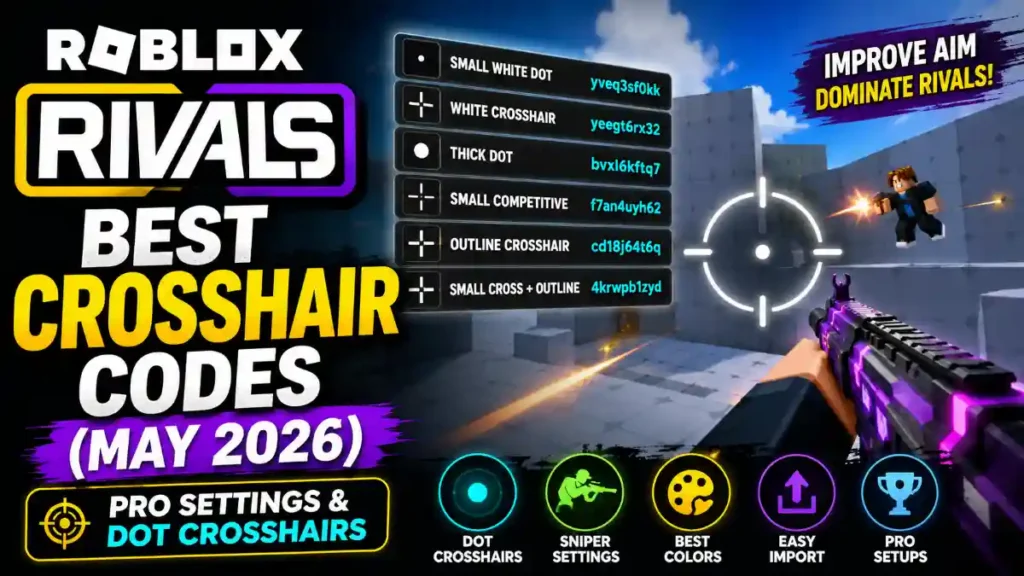
Here are some of the best and most popular crosshair codes currently used by Rivals players.
| Crosshair Style | Code | Best For |
|---|---|---|
| Small White Dot | yveq3sf0kk | Precise aiming |
| White Crosshair | yeegt6rx32 | Balanced gameplay |
| Thick Dot Crosshair | bvxl6kftq7 | Better visibility |
| Small Competitive Crosshair | f7an4uyh62 | Sweaty players |
| Outline Crosshair | cd18j64t6q | Tracking enemies |
| Small Cross + Outline | 4krwpb1zyd | Ranked matches |
These crosshairs are popular because they do not block your screen too much while aiming.
Best Dot Crosshair for Rivals
Dot crosshairs are currently the most popular choice in Roblox Rivals. Many pro and high-level players prefer them because they are simple and accurate.
Recommended Dot Crosshair Code
yveq3sf0kk
Why players like it:
- Very clean look
- Easy to track targets
- Great for revolver and sniper
- Helps improve precision
A small dot crosshair works especially well if you play aggressively or focus on headshots.
Best Sniper Crosshair Settings
Sniper players usually prefer a tiny dot or a very small crosshair. Large crosshairs can make long-range aiming harder.
Best sniper settings:
- Small size
- White or cyan color
- Thin outline
- No animation
- High opacity
These settings make enemies easier to see while scoped or quick-scoping.
Best Crosshair Colors in Roblox Rivals
Crosshair color is very important because some colors are easier to see during fights.
Here are the best colors used by Rivals players:
- White
- Cyan
- Light Green
- Yellow
Most players avoid dark colors because they can blend into maps and enemies.
How to Import Crosshair Codes in Roblox Rivals
Using crosshair codes is very easy.
Follow these steps:
- Open Roblox Rivals
- Go to Settings
- Open the Crosshair section
- Click Import Code
- Paste the crosshair code
- Save your settings
After importing the code, try it in training mode or normal matches to see if it feels comfortable.
Best Pro Crosshair Settings
If you do not want to use import codes, you can create your own pro-style crosshair.
Here are recommended settings:
- Type: Static
- Color: White
- Size: Small
- Thickness: Medium
- Outline: ON
- Gap: Small
- Opacity: 100%
- Animation: OFF
These settings are simple and work well for most weapons.
Do Crosshairs Improve Aim?
A crosshair alone will not instantly make you a pro player, but it can help improve consistency and visibility. The right crosshair helps you focus better and place shots more accurately.
Still, practice is the most important thing. Try different crosshairs and use the one that feels natural for you.
Tips to Choose the Best Crosshair
Here are some quick tips:
- Use small crosshairs for competitive play
- Avoid very large shapes
- Choose bright colors
- Test different styles in training
- Keep the screen clean and simple
Many players change their crosshair depending on the weapon they use.
Final Words
Custom crosshair codes are one of the easiest ways to improve your experience in Roblox Rivals. Whether you want a tiny dot crosshair, sniper settings, or a competitive pro setup, there are many great options available.
The best thing to do is test multiple crosshairs and find the one that matches your playstyle. Small and simple crosshairs are currently the most popular among experienced Rivals players because they help with visibility and precision.
Keep practicing, improve your movement, and combine good aim settings with smart gameplay to become a better Rivals player.